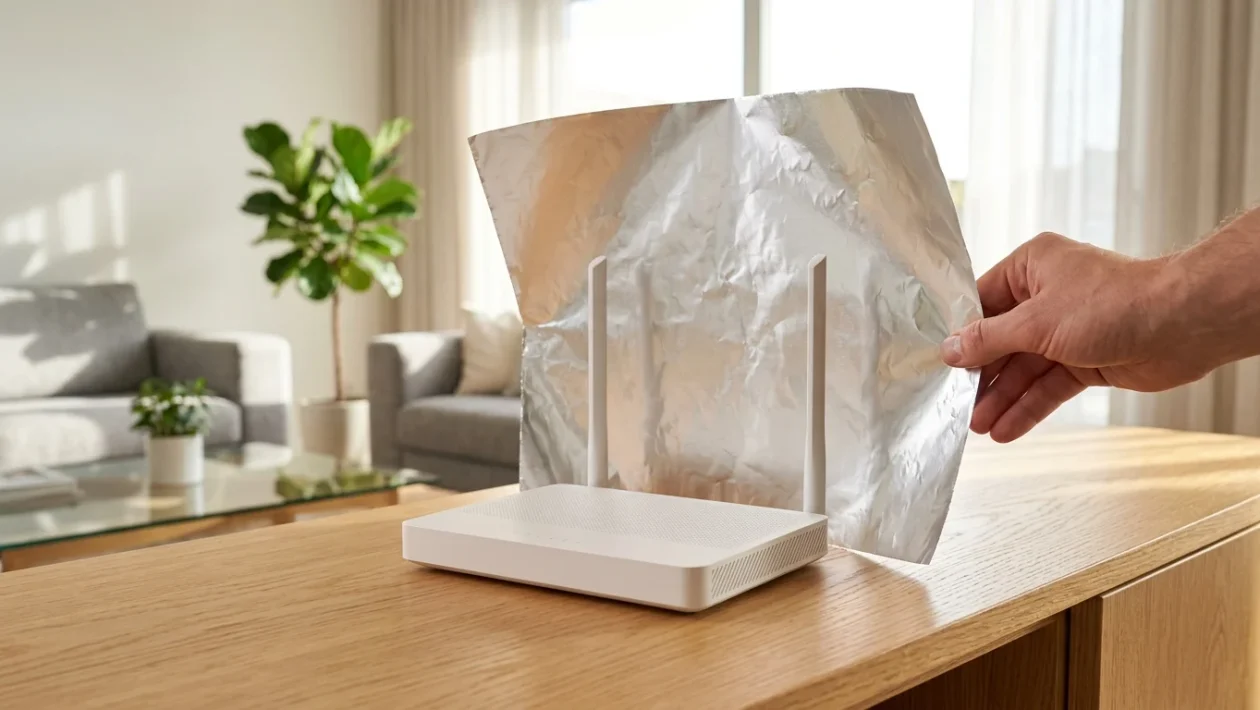
Aluminum foil shaped into a curve behind a Wi-Fi router to reflect the signal.
Wi-Fi dropouts are a constant frustration in modern households. Poor connections routinely disrupt remote work, online classes, and everyday browsing.
Before investing in expensive mesh networks or hardware extenders, a simple kitchen staple can significantly improve your home’s internet range. All you need is a standard roll of aluminum foil.
Why the Aluminum Foil Hack Works
Aluminum is a highly conductive material that naturally reflects wireless frequencies. When placed behind a router’s antennas, the foil acts as a directional shield.
This barrier prevents the Wi-Fi signal from leaking into useless areas, such as thick exterior walls or neighbors’ apartments. Instead, it catches the signal and bounces it forward, concentrating your connection entirely on the rooms where you actually need it.
How to Apply the Foil Trick
Setting up this makeshift signal booster takes less than five minutes. Follow these exact steps to maximize your coverage:
- Unplug the modem: Always disconnect the power source first to ensure safety while handling the device.
- Cut the foil: Tear off a rectangular piece of aluminum foil measuring approximately 20 by 30 centimeters.
- Shape the metal: Give the foil a slight, uniform curve to create a parabolic reflector shape.
- Position the shield: Place the curved foil directly behind the router’s antennas. Face the curve toward the center of your home, blocking the physical direction where you do not need internet access.
The 30-Centimeter Rule and Other Signal Boosters
If foil isn’t enough, implement the “30-centimeter rule.” This requires keeping all other electronic devices at least 30 centimeters away from the router to prevent severe frequency interference.
Network specialists also recommend a few standard adjustments to fully optimize a struggling home connection:
- Switch your network to the 5GHz band for faster speeds at close range.
- Disconnect old devices and smart appliances that hoard bandwidth in the background.
- Position the modem as high as possible, such as on top of a bookshelf, to allow the signal to clear physical obstacles.
- Adjust the router’s external antennas by pointing one straight up and laying the other completely horizontal.
- Contact your service provider to upgrade your internet plan if your current bandwidth can no longer support your household’s daily traffic.