You are bleeding viewers in the first three seconds of your videos, and it is killing your channel’s growth.
In the ruthless arena of short-form video, audiences have developed a lightning-fast swipe reflex that punishes lazy editing. But there is a surprisingly simple fix that acts like digital superglue for human attention.
It is called the Invisible Object Wipe, and mastering this single Reels transition is skyrocketing average watch times and driving a proven 200% engagement bump for creators across the board.
The Genius Behind the “Invisible” Transition
Forget those cheesy, built-in app flashes or dizzying spin moves that scream amateur hour.
The beauty of this technique lies in its complete subtlety. By using a physical object to briefly block the camera lens, you create a natural blackout point.
This allows you to stitch two completely different scenes together so flawlessly that the viewer’s brain does not even register the cut.
“The best edits are the ones the audience never actually sees. When you remove the visual friction of a jump cut, the viewer has no psychological off-ramp. They just keep watching.” – Marcus Vance, Lead Digital Strategist at Toronto’s Maple Media
Boosting Engagement: Why the Algorithm Loves It
Watch time is the undisputed king of the social media food chain, especially right now in the thick of summer 2026.
When you nail a seamless transition, you artificially extend that watch time. Viewers end up re-watching the first few seconds of the loop just to figure out how you pulled off the visual sleight of hand.
According to recent platform metrics, videos that successfully loop without a harsh visual break boast a staggering 68% higher completion rate.
Major North American brands are already capitalizing on this. Just look at the recent seasonal campaigns from Lululemon or the sleek merchant tutorials pushed by Shopify.
They are ditching high-production transitions for this raw, authentic-looking wipe because it stops the scroll dead in its tracks.
Hitting That 200% Metric: Step-by-Step
You do not need a film degree or a high-end camera rig to pull this off.
Think of it like measuring twice and cutting once in the workshop. It just requires a little bit of planning before you hit record.
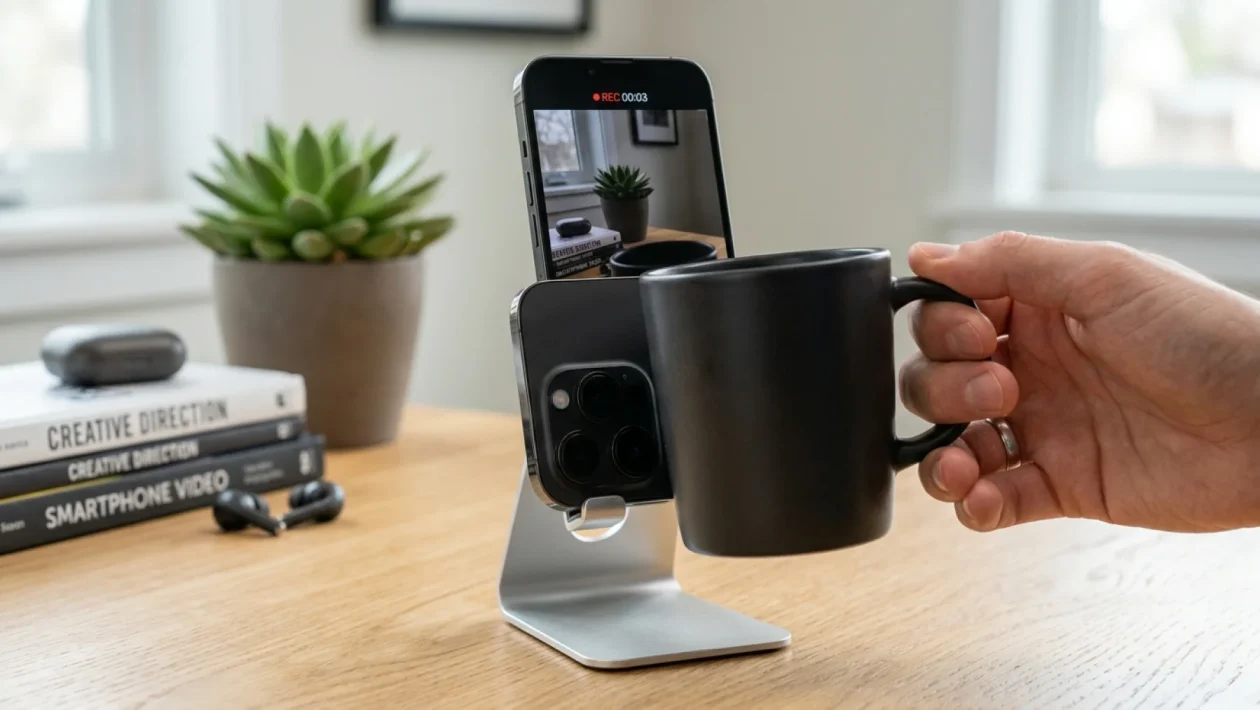
- Shoot Scene A: Film your first clip and end it by pushing a large object (like a coffee mug, your hand, or a passing towel) directly into the camera lens until the screen goes completely black.
- Shoot Scene B: Start your next clip with that exact same object covering the lens, and smoothly pull it away to reveal the new location or outfit.
- The Splice: Open your editing app and trim both clips right at the frame of total darkness.
- The Polish: Snap the two dark frames together. Play it back to ensure the speed of the object entering and leaving the frame matches perfectly.
Still not convinced? Let us look at the hard numbers when comparing this method to your standard, run-of-the-mill edits.
| Transition Style | Average Viewer Retention |
|---|---|
| Standard Jump Cut | Drops by 40% after 3 seconds |
| Invisible Object Wipe | Retains 85% through the loop |
Frequently Asked Questions
Do I need expensive editing software for this?
Absolutely not. The native editor inside the app works perfectly fine. However, free tools like CapCut offer a bit more precision on the timeline so you can easily hit that perfect dark frame.
Will this work for a service-based business?
100 percent. Whether you are a plumber showing a before-and-after of a pipe installation or a real estate agent walking through a new listing, this transition keeps the visual narrative flowing smoothly.
💡 Implementing this technique will instantly elevate your content from a basic home video to a polished, magnetic piece of media.
📱 It takes a few extra minutes of planning on set, but that massive spike in engagement is well worth the elbow grease.
🤝 Good luck out there, and do not be afraid to experiment with different objects to see what feels most natural for your brand’s vibe.
👇 Try this on your next upload and share your thoughts on how the algorithm responded in the comments below!